Tuesday, March 31, 2015

Be aware of SSN3PSXCSA replace Cross-connect Board on OptiX OSN 3500

Summary:
When an SSN3PSXCSA (Ver.B) board is used to replace another cross-connect board, after theSSN3PSXCSA (Ver.B) board is inserted into the subrack, the state of the original active cross-connect board is abnormal and NE services are interrupted. After about 40s, the state of the original active board is back to normal and services recover.
[Problem Description]Fault symptoms:
When an SSN3PSXCSA (Ver.B) board is inserted into the slot of the standby cross-connect board, the ACT indicator of the active cross-connect board turns from steady green to off and services are interrupted. The NE may report the PLL_FAIL alarm of service boards.
Trigger conditions:
Use an SSN3PSXCSA (Ver.B) board to replace another kind of cross-connect board. This problem does not occur if the original active cross-connect board is an SSN3PSXCSA board.
Identification method:
This problem can be identified if the following conditions are met.
  • Services are interrupted for about 40s when you use an Huawei OptiX OSN 3500 SSN3PSXCSA (Ver.B) board to replace a non-SSN3PSXCSA cross-connect board.
  • The new board must be an SSN3PSXCSA board in Ver.B, which can be verified by checking the silkscreen on the board, as is shown in the following figure:
SSN3PSXCSA in Ver.B,


After the board starts, you can also obtain the board version using the NMS.
[Root Cause]
When the SSN3PSXCSA (Ver.B) board is powered on as a standby cross-connect board, before the logic is loaded, the status bus sent to the active cross-connect board is incorrect. As a result, the active cross-connect board is switched to be a standby board and services are interrupted. After the logic of the board is loaded, the status bus sent to the original active board, the status of the original active board and NE services are all back to normal. The service interruption lasts for about 40s.
[Impact and Risks]
When the SSN3PSXCSA (Ver.B) board is inserted into the slot of standby cross-connect board and the active cross-connect board is not an SSN3PSXCSA (Ver.B) board, services are interrupted for about 40s.
[Measures and Solutions]
Recovery measures:
Remove the SSN3PSXCSA (Ver.B) board from the slot of standby cross-connect board.
Workaround:
For different board versions, when a board is used to replace a different board, different commands are required to forcibly stop the active/standby switching. For a specific scenario, contact GTAC to obtain the corresponding command.
Solution:
Use an SSN3PSXCSA in Ver.C to perform the board replacement.
Material handling after replacement:
Use SSN3PSXCSA (Ver.B) boards as good boards to replace other SSN3PSXCSA boards on huawei transmission equipment.

Monday, March 23, 2015

3G service not pass in STM-1 due to SNCP problem

【Problem Summary】”3G service not pass in STM-1 by LAG_Ticket
【Problem Details】Product Information: OptiX OSN 3500 Version Information: V1R8 SR Severity: Major Problem Description: 3G service not pass in STM-1 by LAG
Customer requirement:
to pass combined (2G+3G service) through 2 path as active and protection.

1.    MW path
2.    Huawei Optix STM-1 path
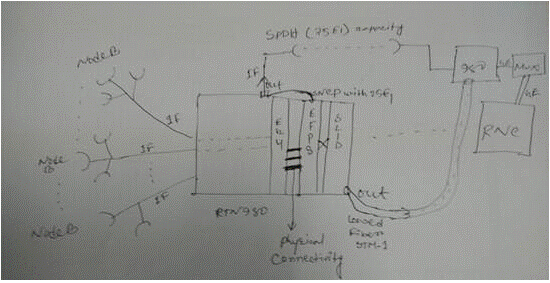
Due to SNCP by EG4 card SNCP not possibileafter using EFP8 card as SNCP sink,SNCP possible.【Resolution Summary】
【Resolution Details】
there are physical connecting between EG4 and EFP8.

The service route is IF — EG4(Eth port) — EFP8(Eth port) — SPDH — IF     — SL1D  — IF

SNCP configuration should be configured on Huawei optical interface board–EFP8.
SNCP configuration

Tuesday, March 17, 2015

10G link service was abnormal of OSN 8800

One 10G link service was abnormal of Huawei WDM OSN 8800. Getting lambda down due to which multiple POI’s, voice and enterprise services were down.

J0 trace test done on TQX board of Huawei side.

As per the analysis done and J0 test on TQX board on Huawei side, found J0 Alcatel did not received from alcatel MUX.

J0 sent from SLQ64 board of Huawei 8801 MUX slot 36-2 did not match.

Wrong connectivity observed at site.

The root cause of this issue is fiber on Huawei 8802 was wrongly connected to Huawei 8801 port 36-2 instead of slot5-4 on ALCATEL MUX.

1.   Short Term: Optimize the trail to other path and lock the ASON rerouting functionality.

2.   Long Term: It was observed that the fiber was wrongly connected to Huawei Mux 8801 slot 36-2 which should have been connected to ALCATEL MUX on slot5-4. After connecting fiber to correct port on ALCATEL side, switchover testing done and found services working fine on Huawei optix OSN 8800.

Verification of J0 trace on important service and newly integrated services for identifying the correct fiber connection.

Tuesday, March 10, 2015

Watch out Wavelength Information of the TNF1X40 on the OSN 1800

Summary:
The wavelength information of the huawei dwdm TNF1X40 board is not verified at the equipment manufacturing and assembly stage. As a result, wavelength information at some ports of the board is not recorded.
[Problem Description]
Trigger conditions:
Wavelength informaion is not properly displayed when the wavelength information of the TNF1X40 board is queried.
Symptom:
Wavelength informaion of the TNF1X40 board is not properly displayed.
Identification method:
  •  When the wavelength information of the TNF1X40 board is queried through the NMS, the wavelength information of some ports is not displayed.
For example, the wavelength information of the MD02 and MD03 ports is not displayed, as shown in the following figure.
TNF1X40 board MD02 and MD3 ports
  • When the wavelength information of the TNF1X40 board is queried through the Navigator, the wavelength information of some ports is displayed as 255. For example, the wavelength information of the MD02 port (optical port 3, in slot 3) is displayed as 255, as shown in the following figure.
TNF1X40 board MD02 ports
[Root Cause]
The wavelength information of the TNF1X40 board is not verified during manufacturing tests. As a result, wavelength information at some ports of the board is not recorded.
[Impact and Risk]
Wavelength information of the TNF1X40 board cannnot be properly reported, and logical fiber connections fail to be established. Services are not affected.
[Measures and Solutions]
The recovery measures apply to the case of TNF1X40 used on the  OptiX OSN 1800 I/II Chassis, if the board need to be record is used on the OptiX OSN 1800 OADM Frame, please replace it on the Huawei OptiX OSN 1800 I/II Chassis.
Recovery measures:
Complete the following steps:
1. Record wavelength by running the :optp:$hexbid,1,83,1,13,08,$port,3,$num command, wherein Hexbid indicates the slot ID (hexadecimal) of the TNF1X40 board, Port indicates the port ID, and Num indicates the wavelength number.
Note: For information about the port ID and wavelength number used in the command, refer to Attachment 1. For example, to record the wavelength of the MD09 port of the TNF1X40 board in slot 3, run the :optp:3,1,83,1,13,08,a,3,1d command.
2. Verify the wabelength records by querying the wavelength information of each port of the huawei dwdm TNF1X40 board through the NMS and comparing the queried information with the standard wavelength information in Attachment 2.
Workarounds:
None.
Preventive measures:
On March 15th, 2013, the manufacturing and assembly department updated the software version for testing and added wavelength recording into the updated version.

Monday, March 9, 2015

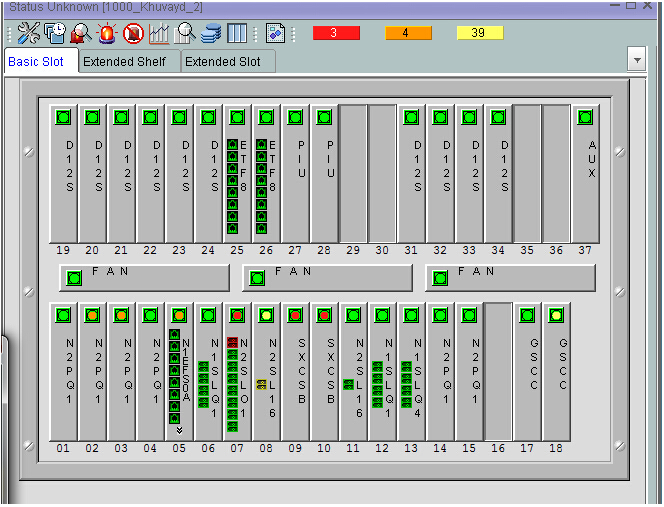
Why all the boards on OSN 3500 become grey?

Problem: no operation do, but all the board of osn3500 become grey. service is ok.
version: OSN3500 V100R009C04SPC200
OSN 3500 SLOT
the possible reasons for this issue:
1. NE of Huawei MSTP OSN 3500 is in install status
2. some task of soft are suspended

handle procedures:
1. confirm with l1 that service is ok
2. check current alarm, no install alarm on NE
3. use :sys-get-alltaskinfo check all task status. find task of TALM is suspended. normally, there should only two tasks are suspended(tIonNbsSch and VOS_Entry).
#9-50:szhw [1000_Khuvayd_2  ][][2014-08-07 15:34:13+08:00]>
:sys-get-alltaskinfo
SYSTEM-TASK-LIST
Task-Name        Mod-Name         State    Prio
BOX                               READY    170
_TIL                              PEND     0
VIDL                              READY    254
TICK                              PEND     1
tExcTask                          PEND     0
tVosTimer                         PEND     55
tVos100ms                         PEND     100
tVos1s                            PEND     100
tVfsWorker       VOS              PEND     90
tVfsSender       VOS              PEND     110
tVfsSchemer      VOS              DELAY    150
tBDMLow1S        BDM              DELAY    150
tDmmCCardSend    DMM              PEND+T   70
……
ERRPICK          ERRPICK          PEND     100
018tMon          MON              READY    120
tSnmpRsp         SNMP             PEND     100
tSnmpReq         SNMP             DELAY    100
tBmMain          BM               PEND     120
tBMR             BM               PEND     100
TALM             MALM             SUSPEND  130
018tFiP          MALM             DELAY    150
……
               TNTPHSC          NTP              PEND     80
TNTPMML          NTP              PEND     80
TNTPP            NTP              PEND     110
tIonDmmRcv       ION              PEND     75
tIonNbsSch       ION              SUSPEND  70
tIonSckRcv       ION              DELAY    75
tIpAround        ION              PEND     100
TPTHPKG          BDM              PEND     130
TSRLMHSC         BDM              PEND     80
tCOARx           CoaAdp           READY    120
tCOATx           CoaAdp           PEND+T   120
tCOAPP           CoaAdp           READY    120
037TBDMcmd       BDM              PEND     120
037TBDMcmdreset  BDM              DELAY    120
037tDBD          Harddriver       DELAY    130
……
tPortmapd                         PEND     54
tTelnetd                          PEND     55
tFtpdTask                         PEND     55
tWdbTask                          PEND     3
tChkAux                           DELAY    100
VOS_Entry                         SUSPEND  70
OSPCLK                            DELAY    1
tVosClearDog                      DELAY    250
MccRxTask                         PEND     50
MccFlowTask                       DELAY    100
……
Total records :180    

4. after warm reset the master scc, Huawei transmission boards become green. NE works normal.   
the task of TALM  is suspended abnormally, then cause this issue.
warm reset the master scc can restart all the tasks.

Wednesday, March 4, 2015

Problem with Huawei WDM OSN 6800 log out from T2000 Frequently?

The metro WDM system of the local network comprises the OptiX OSN 8800 and the OptiX OSN 6800 devices. The software version of both the OptiX OSN 8800 and the OptiX OSN 6800 is 5.51.04 .24. The version of the iManager T2000 is V2R 7C 02. The customer reports that NE 6 -221 in the system logs out from the iManager T2000 frequently. Logging in to NE 6-221 by using the relevant command line fails.
Log in to NE 9-188 by using the relevant command, and then run the cm-get-eccroute command.
The system returns the following data:
0x000600dd  0x000600dd   0    4    auto      47      11
The returned data shows that the ECC from NE 9-188 to NE 6-221 is normal. Logging in to NE 6-221 by using the relevant command line, however, remains unsuccessful.
The iManager T2000 shows that NE 9-188 is not connected directly to NE 6-221. Other NEs exist between NE 9-188 and NE 6-221. Why does the eccroute data show the distance is 0?
Check the channel allocation of the WDM system.
It is detected that a service channel is configured between NE 9-188 and NE 6-221. The service in that channel passes through the intermediate station.
Re-log in to NE 9-188, and then run the cm-get-newbdinfo command.
The system returns the following data:
 21       255       1     port-enable   GCC12_18      47         ok 
The gateway NE 9-188 monitors NE 6-221 through the ESC of the optical port in slot 21 on board 1. The check shows that a large number of performance events exist in the corresponding channel. The cause for the problem is located: The current Huawei WDM system supports OSC-based and ESC-based monitoring modes. The system uses the ESC-based monitoring by default because of the bandwidth. When the signal performance of the ESC channel deteriorates, the monitored devices log out from the iManager T2000 frequently or even logging in to the device fails.
When the signal performance of the ESC channel deteriorates, the monitored devices log out from the iManager T2000 frequently or even logging in to the device fails.
On the iManager T2000, disable the ESC communication in slot 21 of NE 9-188.
NE 6-221 is displayed as normal on the iManager T 2000 a few minutes later. In addition, logging into NE 6-221 succeeds.
Run the cm-get-eccroute command on NE 9-188.
The system returns the following data:
0x000600dd  0x000900bd    1     4    auto       1       90   

The distance between gateway NE 9-188 and NE 6-221 is 1. This shows that the gateway NE monitors NE 6-221 through the OSC.The ESC-based monitoring of the WDM system is affected by the relevant channel performance. Therefore, faults often occur in actual applications. It is recommended that all new metro Huawei WDM systems use the OSC-based monitoring.