Wednesday, May 13, 2015

XFP not supporting FC800 services OSN8800 TN55TQX

TN55TQX card in general supports various service types including STM-64, OC192, 10GE, FC800, FC1200 or OTU2. However there are dedicated XFP modules (BOMs) for different services. Unfortunately U2000 does not alert or notify when user creates service with wrong XFP type. Moreover many XFPs will actually work although wrong service type is created. For example customer ordered several TQX cards equipped with: 10GE/STM64 dedicated XFPs (BOM 34060313), and FC800 dedicated XFPs (BOM 34060658). However XFPs arrived distributed randomly and customer didn’t pay attention to verify XFP type while creating services. Unexpectedly most services ware working although wrong XFP BOMs were used. Eventually one of the FC800 services failed and after investigation XFPs mismatch across the network has been discovered on OSN 8800.
Software version OSN 8800 V100R007C02SPC200
iManager U2000 V100R008C00SPC300
The following XFP types have been delivered to the customer:
BOM 34060313 (dedicated for STM64/10GE):
-          FTLX1412M3BCL(also working when FC800 configured)
-          FTLX1413M3BCL-HW (also working when FC800 configured)
-          SXP3104NV-H1
-          TRF5013FN-GA420
-          TRF5015FN-GA420
BOM 34060658 (dedicated for FC800 services):
-          PT745F-81-1D (also working when 10GE or STM64 configured)
The problem with XFP mismatch has been discovered when FC800 service was created with XFP SXP3104NV-H1 type.  U2000 didn’t rapport any problems although the far end equipment reported link down. The issue has been resolved by relocating XFPs across the network to get dedicated XFPs for all relevant services.Wrong XFP types were used when crating FC800 serviceXFP modules relocation
Although some XFP types can work even when incorrect service type is created, this configuration is not recommended or supported by Huawei transport network. There is no guarantee this configuration is stable, and under certain conditions errors might occur.

Tuesday, May 12, 2015

Huawei Commercially Launches the World’s First 10Gbps Broadband Service with HKT

Lately,Huawei announces its cooperation with Hong Kong Telecom(HKT), to introduce the world’s first 10Gbps Fiber-To-The-Home (FTTH) access by using Huawei XG-PON (also known as 10G-Huawei GPON) solution, which brings in high-definition video and more beautiful experience for users in Hong Kong .
Hong Kong Telecom launched 10Gbps broadband services in early 2015, while services is only provided to specific customers in the early stage, and extend to general customers in the third quarter. Hong Kong Telecom together with Huawei successfully completed the world's first commercial deployment of 10Gbps access, via covered wide range of fiber-optic telecommunications network, the 10G-GPON solution performs 10 times faster than current offering in terms of speed, be the first in the world to broadband access leading to 10Gbps access era. 
High speed connection is very suitable for high-definition multimedia content such as cloud-based platform for sharing and storage. Users can upload and download numerous photos and videos like local storage, for example, it would takes only 20 seconds or so to download 25GB HD movie at the rate of 10Gbps. Users will also be able to select their preferred 4K camera viewing angle, the resolution available through the transmission will be four times sharper than conventional HD.
Currently, Huawei has already completed the 10Gbps business preparation issuance based on 10G-GPON with Hong Kong Telecom, it can be provided to specific users in the second quarter of 2015, based on a new generation of Huawei OLT platform MA5800 and its unique XG-PON gateway ONT (Optical network terminal, optical network terminal), users can experience the 10Gbps Internet download speed, 1Gbps Wi-Fi speed and 5Gbps USB3.0 speed and experience has been significantly improved at the same time.
As a global leader in the field of fixed access network, Huawei is building a future-oriented leading network for customers through SingleFAN solutions, and integrating GPON / 10G-GPON / TWDM-PON through a unified platform. Huawei’s SingleFAN solutions have been serving more than 1/3 broadband users, to provide users with ultra-bandwidth access services, enrich people's lives through communication.

Wednesday, May 6, 2015

10GE LAN link flapping on customer router due to SNCP switch

【Problem Summary】Huawei DWDM 10GE LAN link from Hyderabad to Banaglore flapping on customer router. 
【Problem Details】Below is the diagram shown end to end connectivity details :-

Huawei DWDM topology

The end points which is connected to the router is on the LSX cards. You can refer to the PDF for end to end connectvity details.When there is fiber cut in any ring, there is ODUk SNCP ring switch. Below alarm flow to the router which causes router to flap :-

SNCP

Although the ring is within 50ms, this will still cause the router to flap. So customer asked us how to avoid this flapping.
Below two causes has been obeserved in this router flapping :-

1. Whenever there is ODUk SNCP ring switch in any ring, it will cause the SNCP switch in the other rings due to SNCP cascade effects so to avoid that we should set hold off time in the ODUk SNCP protection group in each SNCP protection group. but in this case we can`t ensure the switching within 50ms. Total switching time will be :-

                          Hold-off Time in ODUk SNCP Protection Group +<= 50ms(Means whatever will be th exact switching time). 

This will also cause the router flapping. This point only help to avoid the SNCP cascade effects i.e before switching will happen in the other rings it will wait for 100ms.


2. Principles of Router 
(1)Router includes physical layer and protocol layer
(2)Condition which can trigger physical layer down: R_LOS/R_LOF/AIS/RDI;
(3)Condition which can trigger protocol layer down:
Whenever physical layer is down, protocol layer will be down;
When physical layer is up but the hello protocol packets between Routers are lost continuously;
(4)Hold off time: the waiting time when physical layer detects the condition which can trigger itself down ,  suggest setting hold off time as 200ms;
(5)Hold up time: the waiting time when physical layer cannot detect the condition which triggered itself down ,


【Resolution Summary】 Set the hold off time in Router and Hold off time in each ODUk SNCP protection group.
【Resolution Details】

We have to set the hold off time in each SNCP protection group of 100ms, so this will make the actual switching time more than 100ms.Actually switching time will be:-

                                Hold-off Time in ODUk SNCP Protection Group +<= 50ms(Means whatever will be th exact switching time). 

And need to set the hold off time in router should be greater than the above time. To avoid this flapping.
Required to set the hold off time in ODUk SNCP protection group and in router as well to avoid flapping on OSN 1800.

Thursday, April 16, 2015

How to Prevent a License Defect Flash Exhaustion on the Main Control Board

Abstract: When the license module processes interchange messages for hot standby between the working and protection Huawei main control boards, commissioning information will accumulate to the flash and finally exhaust the flash space. As a result, configuration data fails to be saved and database backup fails.
[Problem Description]
Trigger conditions:
Two main control boards are configured on an NE of a version listed in “Involved Versions”.
Symptom:
The flash space on the protection main control board is consumed at a speed twice of that on the working main control board. Therefore, this issue occurs on the protection main control board earlier than on the working main control board.
1. If no sufficient flash space is available for periodic database backup, the backup will fail and the DBMS_ERROR alarm will be reported.
2. Extra small files need to be generated in the case of configuration deployment or dynamic services. If no sufficient flash space is available, these files cannot be generated, causing an NE reset and inconsistency between the working and protection main control boards (the result of :hbu-get-backup-info is 0×00000002).
3. If the flash space is insufficient during an NE upgrade, the upgrade will fail.
Identification method
  •  An NE of a version listed in “Involved Versions” is deployed.
  •  The NE has two main control boards.
[Root Cause]
When the license module processes interchange messages for hot standby between the working and protection main control boards, commissioning information will accumulate to the flash and finally exhaust the flash space. (The working main control board consumes 1 M flash space per 20 days and the protection main control board consumes 1 M flash space per 10 days.)
[Impact and Risks]
The flash space will be exhausted.
1. If the flash space is insufficient for periodic database backup, the backup will fail and all new configuration data may be lost upon a reset.
2. If the flash space is insufficient, desired small files cannot be generated, causing an NE reset and inconsistency between the working and protection main control boards (the result of :hbu-get-backup-info is 0×00000002). In addition, a rest on the working main control board may result in loss of new configuration data. .
3. If the flash space is insufficient during an NE upgrade, the upgrade fails.
[Measures and Solutions]
Recovery measures:
  • If the DBMS_ERROR alarm is reported, do as follows:
1. Run the following commands to query whether the HBUMSG.TXT file exists on the working or protection main control board:
:sftm-show-dir:working board,”ofs1/license”
:sftm-show-dir:protection board,”ofs1/license”
2. If yes, run the following commands to delete the file:
:sftm-delete-file:working board,”ofs1/license/HBUMSG.TXT”
:sftm-delete-file:protection board,”ofs1/license/HBUMSG.TXT”
  •  If the protection main control board is reset, do as follows:
1. If data synchronization fails between the working and protection Huawei main control board, issue the following command to the working main control board:
:sm-set-nebusy:0,0,0,0,none
2. Run the following commands to query whether the HBUMSG.TXT file exists on the working or protection main control board:
:sftm-show-dir:working board,”ofs1/license”
:sftm-show-dir:protection board,”ofs1/license”
3. If yes, run the following commands to delete the file:
:sftm-delete-file:working board,”ofs1/license/HBUMSG.TXT”
:sftm-delete-file:protection board,”ofs1/license/HBUMSG.TXT”
  • If the working main control board is reset, do as follows:
1. If data synchronization fails between the working and protection main control board, issue the following command to the working main control board:
:sm-set-nebusy:0,0,0,0,none
2. Run the following commands to query whether the HBUMSG.TXT file exists on the working or protection main control board:
:sftm-show-dir:working board,”ofs1/license”:sftm-show-dir:protection board,”ofs1/license”
3. If yes, run the following commands to delete the file:
sftm-delete-file:working board,”ofs1/license/HBUMSG.TXT”
:sftm-delete-file:protection board,”ofs1/license/HBUMSG.TXT”
4. If new configuration data is lost, reconfigure the new services.
Workarounds:
Use the health check tool to periodically (recommended: every six months) check the NEs of the involved versions on the live network. For details on the health check tool, see “Support for the Health Check Tool.”
Solution:
For OSN 3500/OSN 7500 product, upgrade software to V200R011C00SPC300 or a later version.
For OSN 1500 product, upgrade software to V200R011C00SPC300 or a later version; or upgrade software to V200R011C01SPC103 or a later version.
Material handling after replacement:
None
[Support for the Health Check Tool]
The SmartKit NSE2700 V200R006C00 Inspector is supported and can be upgraded to the latest version. The health check item is “Common_Platform_Checking/Check if HBUMSG.TXT file exist in active and standby SCC”.
[Rectification Scope and Time Requirements]
None

Tuesday, March 31, 2015

Be aware of SSN3PSXCSA replace Cross-connect Board on OptiX OSN 3500

Summary:
When an SSN3PSXCSA (Ver.B) board is used to replace another cross-connect board, after theSSN3PSXCSA (Ver.B) board is inserted into the subrack, the state of the original active cross-connect board is abnormal and NE services are interrupted. After about 40s, the state of the original active board is back to normal and services recover.
[Problem Description]Fault symptoms:
When an SSN3PSXCSA (Ver.B) board is inserted into the slot of the standby cross-connect board, the ACT indicator of the active cross-connect board turns from steady green to off and services are interrupted. The NE may report the PLL_FAIL alarm of service boards.
Trigger conditions:
Use an SSN3PSXCSA (Ver.B) board to replace another kind of cross-connect board. This problem does not occur if the original active cross-connect board is an SSN3PSXCSA board.
Identification method:
This problem can be identified if the following conditions are met.
  • Services are interrupted for about 40s when you use an Huawei OptiX OSN 3500 SSN3PSXCSA (Ver.B) board to replace a non-SSN3PSXCSA cross-connect board.
  • The new board must be an SSN3PSXCSA board in Ver.B, which can be verified by checking the silkscreen on the board, as is shown in the following figure:
SSN3PSXCSA in Ver.B,


After the board starts, you can also obtain the board version using the NMS.
[Root Cause]
When the SSN3PSXCSA (Ver.B) board is powered on as a standby cross-connect board, before the logic is loaded, the status bus sent to the active cross-connect board is incorrect. As a result, the active cross-connect board is switched to be a standby board and services are interrupted. After the logic of the board is loaded, the status bus sent to the original active board, the status of the original active board and NE services are all back to normal. The service interruption lasts for about 40s.
[Impact and Risks]
When the SSN3PSXCSA (Ver.B) board is inserted into the slot of standby cross-connect board and the active cross-connect board is not an SSN3PSXCSA (Ver.B) board, services are interrupted for about 40s.
[Measures and Solutions]
Recovery measures:
Remove the SSN3PSXCSA (Ver.B) board from the slot of standby cross-connect board.
Workaround:
For different board versions, when a board is used to replace a different board, different commands are required to forcibly stop the active/standby switching. For a specific scenario, contact GTAC to obtain the corresponding command.
Solution:
Use an SSN3PSXCSA in Ver.C to perform the board replacement.
Material handling after replacement:
Use SSN3PSXCSA (Ver.B) boards as good boards to replace other SSN3PSXCSA boards on huawei transmission equipment.

Monday, March 23, 2015

3G service not pass in STM-1 due to SNCP problem

【Problem Summary】”3G service not pass in STM-1 by LAG_Ticket
【Problem Details】Product Information: OptiX OSN 3500 Version Information: V1R8 SR Severity: Major Problem Description: 3G service not pass in STM-1 by LAG
Customer requirement:
to pass combined (2G+3G service) through 2 path as active and protection.

1.    MW path
2.    Huawei Optix STM-1 path
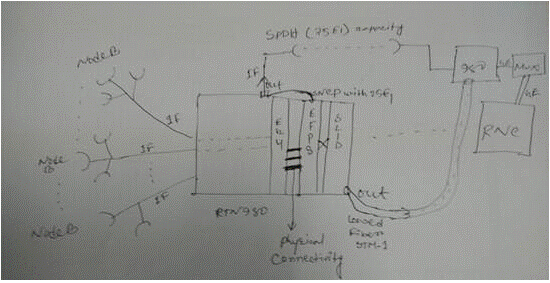
Due to SNCP by EG4 card SNCP not possibileafter using EFP8 card as SNCP sink,SNCP possible.【Resolution Summary】
【Resolution Details】
there are physical connecting between EG4 and EFP8.

The service route is IF — EG4(Eth port) — EFP8(Eth port) — SPDH — IF     — SL1D  — IF

SNCP configuration should be configured on Huawei optical interface board–EFP8.
SNCP configuration

Tuesday, March 17, 2015

10G link service was abnormal of OSN 8800

One 10G link service was abnormal of Huawei WDM OSN 8800. Getting lambda down due to which multiple POI’s, voice and enterprise services were down.

J0 trace test done on TQX board of Huawei side.

As per the analysis done and J0 test on TQX board on Huawei side, found J0 Alcatel did not received from alcatel MUX.

J0 sent from SLQ64 board of Huawei 8801 MUX slot 36-2 did not match.

Wrong connectivity observed at site.

The root cause of this issue is fiber on Huawei 8802 was wrongly connected to Huawei 8801 port 36-2 instead of slot5-4 on ALCATEL MUX.

1.   Short Term: Optimize the trail to other path and lock the ASON rerouting functionality.

2.   Long Term: It was observed that the fiber was wrongly connected to Huawei Mux 8801 slot 36-2 which should have been connected to ALCATEL MUX on slot5-4. After connecting fiber to correct port on ALCATEL side, switchover testing done and found services working fine on Huawei optix OSN 8800.

Verification of J0 trace on important service and newly integrated services for identifying the correct fiber connection.

Tuesday, March 10, 2015

Watch out Wavelength Information of the TNF1X40 on the OSN 1800

Summary:
The wavelength information of the huawei dwdm TNF1X40 board is not verified at the equipment manufacturing and assembly stage. As a result, wavelength information at some ports of the board is not recorded.
[Problem Description]
Trigger conditions:
Wavelength informaion is not properly displayed when the wavelength information of the TNF1X40 board is queried.
Symptom:
Wavelength informaion of the TNF1X40 board is not properly displayed.
Identification method:
  •  When the wavelength information of the TNF1X40 board is queried through the NMS, the wavelength information of some ports is not displayed.
For example, the wavelength information of the MD02 and MD03 ports is not displayed, as shown in the following figure.
TNF1X40 board MD02 and MD3 ports
  • When the wavelength information of the TNF1X40 board is queried through the Navigator, the wavelength information of some ports is displayed as 255. For example, the wavelength information of the MD02 port (optical port 3, in slot 3) is displayed as 255, as shown in the following figure.
TNF1X40 board MD02 ports
[Root Cause]
The wavelength information of the TNF1X40 board is not verified during manufacturing tests. As a result, wavelength information at some ports of the board is not recorded.
[Impact and Risk]
Wavelength information of the TNF1X40 board cannnot be properly reported, and logical fiber connections fail to be established. Services are not affected.
[Measures and Solutions]
The recovery measures apply to the case of TNF1X40 used on the  OptiX OSN 1800 I/II Chassis, if the board need to be record is used on the OptiX OSN 1800 OADM Frame, please replace it on the Huawei OptiX OSN 1800 I/II Chassis.
Recovery measures:
Complete the following steps:
1. Record wavelength by running the :optp:$hexbid,1,83,1,13,08,$port,3,$num command, wherein Hexbid indicates the slot ID (hexadecimal) of the TNF1X40 board, Port indicates the port ID, and Num indicates the wavelength number.
Note: For information about the port ID and wavelength number used in the command, refer to Attachment 1. For example, to record the wavelength of the MD09 port of the TNF1X40 board in slot 3, run the :optp:3,1,83,1,13,08,a,3,1d command.
2. Verify the wabelength records by querying the wavelength information of each port of the huawei dwdm TNF1X40 board through the NMS and comparing the queried information with the standard wavelength information in Attachment 2.
Workarounds:
None.
Preventive measures:
On March 15th, 2013, the manufacturing and assembly department updated the software version for testing and added wavelength recording into the updated version.

Monday, March 9, 2015

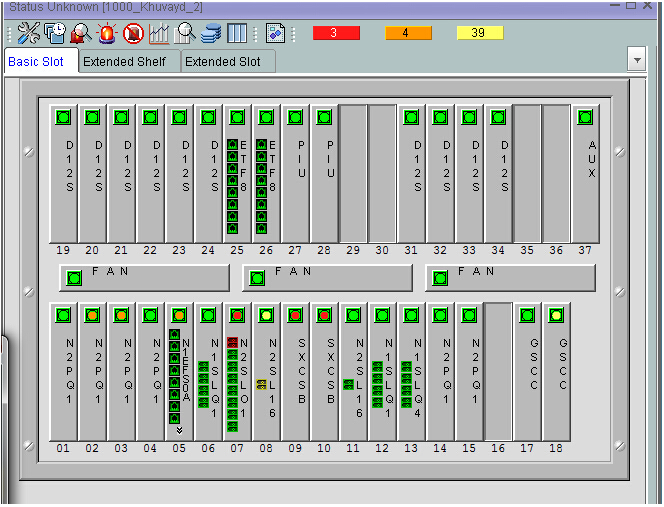
Why all the boards on OSN 3500 become grey?

Problem: no operation do, but all the board of osn3500 become grey. service is ok.
version: OSN3500 V100R009C04SPC200
OSN 3500 SLOT
the possible reasons for this issue:
1. NE of Huawei MSTP OSN 3500 is in install status
2. some task of soft are suspended

handle procedures:
1. confirm with l1 that service is ok
2. check current alarm, no install alarm on NE
3. use :sys-get-alltaskinfo check all task status. find task of TALM is suspended. normally, there should only two tasks are suspended(tIonNbsSch and VOS_Entry).
#9-50:szhw [1000_Khuvayd_2  ][][2014-08-07 15:34:13+08:00]>
:sys-get-alltaskinfo
SYSTEM-TASK-LIST
Task-Name        Mod-Name         State    Prio
BOX                               READY    170
_TIL                              PEND     0
VIDL                              READY    254
TICK                              PEND     1
tExcTask                          PEND     0
tVosTimer                         PEND     55
tVos100ms                         PEND     100
tVos1s                            PEND     100
tVfsWorker       VOS              PEND     90
tVfsSender       VOS              PEND     110
tVfsSchemer      VOS              DELAY    150
tBDMLow1S        BDM              DELAY    150
tDmmCCardSend    DMM              PEND+T   70
……
ERRPICK          ERRPICK          PEND     100
018tMon          MON              READY    120
tSnmpRsp         SNMP             PEND     100
tSnmpReq         SNMP             DELAY    100
tBmMain          BM               PEND     120
tBMR             BM               PEND     100
TALM             MALM             SUSPEND  130
018tFiP          MALM             DELAY    150
……
               TNTPHSC          NTP              PEND     80
TNTPMML          NTP              PEND     80
TNTPP            NTP              PEND     110
tIonDmmRcv       ION              PEND     75
tIonNbsSch       ION              SUSPEND  70
tIonSckRcv       ION              DELAY    75
tIpAround        ION              PEND     100
TPTHPKG          BDM              PEND     130
TSRLMHSC         BDM              PEND     80
tCOARx           CoaAdp           READY    120
tCOATx           CoaAdp           PEND+T   120
tCOAPP           CoaAdp           READY    120
037TBDMcmd       BDM              PEND     120
037TBDMcmdreset  BDM              DELAY    120
037tDBD          Harddriver       DELAY    130
……
tPortmapd                         PEND     54
tTelnetd                          PEND     55
tFtpdTask                         PEND     55
tWdbTask                          PEND     3
tChkAux                           DELAY    100
VOS_Entry                         SUSPEND  70
OSPCLK                            DELAY    1
tVosClearDog                      DELAY    250
MccRxTask                         PEND     50
MccFlowTask                       DELAY    100
……
Total records :180    

4. after warm reset the master scc, Huawei transmission boards become green. NE works normal.   
the task of TALM  is suspended abnormally, then cause this issue.
warm reset the master scc can restart all the tasks.

Wednesday, March 4, 2015

Problem with Huawei WDM OSN 6800 log out from T2000 Frequently?

The metro WDM system of the local network comprises the OptiX OSN 8800 and the OptiX OSN 6800 devices. The software version of both the OptiX OSN 8800 and the OptiX OSN 6800 is 5.51.04 .24. The version of the iManager T2000 is V2R 7C 02. The customer reports that NE 6 -221 in the system logs out from the iManager T2000 frequently. Logging in to NE 6-221 by using the relevant command line fails.
Log in to NE 9-188 by using the relevant command, and then run the cm-get-eccroute command.
The system returns the following data:
0x000600dd  0x000600dd   0    4    auto      47      11
The returned data shows that the ECC from NE 9-188 to NE 6-221 is normal. Logging in to NE 6-221 by using the relevant command line, however, remains unsuccessful.
The iManager T2000 shows that NE 9-188 is not connected directly to NE 6-221. Other NEs exist between NE 9-188 and NE 6-221. Why does the eccroute data show the distance is 0?
Check the channel allocation of the WDM system.
It is detected that a service channel is configured between NE 9-188 and NE 6-221. The service in that channel passes through the intermediate station.
Re-log in to NE 9-188, and then run the cm-get-newbdinfo command.
The system returns the following data:
 21       255       1     port-enable   GCC12_18      47         ok 
The gateway NE 9-188 monitors NE 6-221 through the ESC of the optical port in slot 21 on board 1. The check shows that a large number of performance events exist in the corresponding channel. The cause for the problem is located: The current Huawei WDM system supports OSC-based and ESC-based monitoring modes. The system uses the ESC-based monitoring by default because of the bandwidth. When the signal performance of the ESC channel deteriorates, the monitored devices log out from the iManager T2000 frequently or even logging in to the device fails.
When the signal performance of the ESC channel deteriorates, the monitored devices log out from the iManager T2000 frequently or even logging in to the device fails.
On the iManager T2000, disable the ESC communication in slot 21 of NE 9-188.
NE 6-221 is displayed as normal on the iManager T 2000 a few minutes later. In addition, logging into NE 6-221 succeeds.
Run the cm-get-eccroute command on NE 9-188.
The system returns the following data:
0x000600dd  0x000900bd    1     4    auto       1       90   

The distance between gateway NE 9-188 and NE 6-221 is 1. This shows that the gateway NE monitors NE 6-221 through the OSC.The ESC-based monitoring of the WDM system is affected by the relevant channel performance. Therefore, faults often occur in actual applications. It is recommended that all new metro Huawei WDM systems use the OSC-based monitoring.

Wednesday, February 11, 2015

The alarm of _R_LOF_ in OSN3500 happen incorrectly when the fiber is recovered


Problem SummaryPakistan CMPAK--"Pakistan CMPAK "3001Sha-3013.There are some Huawei SDH equipments issues."" Problem DetailsThe service cannot be revered automatically when the customer fixed the fibers that had been broken. SL64 board of 7500 equipment on Site A report alarm of R_LOF unconventionally, and there were no alarm of 13LSX of 6800 equipment. The service could be recovered when we take the FEC mode of 13LSX to change from AFEC to FEC on site A ,then back to AFEC.The figure below shows the affected line on the network, SL64 board reported “R_LOF”alarm on site SHA:
 The status is normal when the fiber is broken.

 The status is abnormal when the fiber is fixed.
The reason of the “R_LOF” in N4SL64 board reported as below:
² Reason 1A pair of board has difficult rate of the service------cleared: the 13LSX and N4SL64 board have same service’s rate and the service configuration is STM-64(set in 13LSX board) and the remote site was not changed.
² Reason 2The problem of fiber line------cleared: the problem is not caused by WDM fiber broken but the recovery of Huawei WDM fiber, the 13LSX board is OK (no alarms) when the fiber was recovered. The connection between 13LSX and SL64 is not changed.
² Reason 3The receiving end on the board has some problem in SL64 board, cause the frame of signals lost ------waiting be checked, we should check the N4SL64 board.
² Reason 4The transmission end on remote board has some problem, cause the frame of signals lost------waiting be checked, we should check the clock and the frame signals of 13LSX board.

We replaced both 13LSX board and SSN4SL64 board at site A in current network. After this step, problem didn’t reoccur upon testing, moreover, the link is working normally up till now. According to the problem analysis and steps performed during problem troubleshooting, hardware problem is suspected in either LSX or N4SL64 boards in the equipments. We found the XFP module in SL64 board has a problem after R&D analyze the 13LSX and N4SL64 board in lab. the XFP module don't deal with the signals correctly with low probability and caused the alarm of "R_LOF" reported in N4SL64 board when the fiber is recovering instantaneously. The problem was recurred in R&D's lab.the problem is reported with low probability as below: 1. the fiber from "broken" to "normal" 2. The input of optical power is about -8~-11 dBm; 3. The type of XFPis HXFP8441(03030JCB) or HXFP8240(34060322) 4. The bug in XFP module is caused by the quality of signals, which can be fixed by software upgrade.

Resolution Summarythe XFP module in SL64 board is a problem and can be fixed by software upgrade Resolution DetailsThe new XFP will be been fixed in Q1,2014, we can replace the problem XFP with new one. And we also upgrade the version of OSN equipment to V2R12C01spc103 or R10c03 newest version(Both versions will be released on Oct, 2014) in the future.

Monday, February 2, 2015

Technical Case: Optical Network

Optical network within Huawei WDM, Huawei NG-SDH, T2000 double system structure sometimes get some emergency situations, for example: service trail abnormally, network traffic abnormal, device exceptional warning, packet forwarding failure, board abnormal, interface abnormal and etc.

1.1 The detailed network information as follows, Optical network comprises one NG-SDH ASON network and one Backbone WDM network. NG-SDH ASON network is made up of OSN 7500 equipments, and Backbone WDM network is made up of 1600G equipments, the NG-SDH network is constructed upon 1600G Backbone WDM network, NG-SDH ASON network carried customer diamond Service, such as detail network information in the attachment.
2.1.1.WDM Backbone network topology
WDM Backbone networks are made up of 1600G equipment DCN Design of WDM Backbone networks detail information.
2.1.2 NG-OSN ASON network topology
NG-SDH ASON Networks is made up of OSN7500 equipment detail main network topology framework as mentioned.


3.1 Carried Services Analysis
NG-SDH ASON networks carried by WDM Backbone networks, WDM Backbone networks according to different service requirement up and down different wavelength service in the propriety section such as carried networks for customer demand, NG-SDH ASON networks carried ASON service, Currently Configuration all ASON service LSA Level is diamond service on the ASON networks.
3.1.1 Service and Running Status Analysis
During eleven months working and network running for networks, Currently WDM Backbone networks running status is stability, sometimes due to customer provided link fiber frequently by cut would affect WDM Backbone networks stability, it’s our maintenance team come up against an important problem in NOC, at the same time our team very important job supervise customer to solved in time for link fiber cut bring WDM Backbone networks break off.
Currently NG-SDH ASON networks running status is stability, Customer configuration total LSA service is diamond service
from inspector return result view service running is stability and normal, but Customer Choice Revertive parameter when configuration diamond service on the ASON networks, when active service is break off re-route to another trail, due to customer link-fiber cut long time can’t recover , change or modify this service on the NMS by configuration Revertive Parameter LAS service will become disperse service would affect ASON networks running stability and efficiency ,advice change Revertive LAS service to NON-Revertive services for customer.
3.1.2 NMS running status Analysis
NMS type is use T2000, According with every days checking list proved NMS T2000 running status is normal and stability, Currently project process addition many new WDM 1600G and NG-OSN 7500 NE according with originally design divide WDM and OSN ASON to two single NMS Server for monitor, now doing this plan, if completed it NMS running status would be enhance.
3.2 Detailed Devices Information
Optical networks Devices include OTM, OADM, OLA of WDM and OSN7500 of NG-SDH ASON networks, hardware and software configuration, both WDM and ASON network detailed devices information view as follows.
3.2.1 Basic device information
Optical networks basic device information includes type of Huawei WDM and Huawei NG-SDH devices, site configuration information and so on detail information in the attachment.
3.2.2 Device configuration
WDM and NG-Huawei OSN networks Device configuration information including NE board version and NE information, and ASON service detail information such as attachment as follows:
3.3 Risks Analysis
Describe all the risks that have been found during network routing inspection, network evaluation and troubleshooting process; and the possible workaround and solutions.
3.3.1 Network Risk Analysis
During eleven month maintenance in the NOC for WDM and NG-OSN networks, we already mastery about WDM and ASON networks running status, currently network risk mostly focus on item as follow:
1. Customer provided link fiber frequently by cut would affect WDM Backbone networks stability, it’s our maintenance team come up against an important problem in NOC, at the same time our team very important job supervise customer to solved in time for link fiber cut bring WDM Backbone networks break off.
2. Customer Choice Revertive parameter when configuration diamond service on the ASON networks, when active service is break off re-route to another trail, due to customer link-fiber cut long time can’t recover , change or modify this service on the NMS by configuration Revertive Parameter LAS service will become disperse service
would affect ASON networks running stability and efficiency.
3. Due to upload NE of WDM and NG-SDH is new created; software version of board of NE is not match with design.


4 Emergency Solution
When serious problems such as service interruption occur on equipment of WDM and NG-SDG ASON networks, emergency solution provides for the equipment maintenance personnel to locate and remove the fault quickly, Focus on service recovery, divide issues to different scenes and give detailed emergency solutions,To ensure the stable running of the optical transmission system and reduce the emergency accident to the minimum extent. The operation and maintenance to long-term also important project as optical network, summarize the history problems happened, so as to improve the critical problem response process, these type of problem should be enhance Huawei optix network maintenance and emergency response implementation guide confidentiality level.